5f85bf5e8a
* proto: add BalanceMoveSpec and batch fields to BalanceTaskParams

Add BalanceMoveSpec message for encoding individual volume moves,
and max_concurrent_moves + repeated moves fields to BalanceTaskParams
to support batching multiple volume moves in a single job.

* balance handler: add batch execution with concurrent volume moves

Refactor Execute() into executeSingleMove() (backward compatible) and
executeBatchMoves() which runs multiple volume moves concurrently using
a semaphore-bounded goroutine pool. When BalanceTaskParams.Moves is
populated, the batch path is taken; otherwise the single-move path.

Includes aggregate progress reporting across concurrent moves,
per-move error collection, and partial failure support.

* balance handler: add batch config fields to Descriptor and worker config

Add max_concurrent_moves and batch_size fields to the worker config
form and deriveBalanceWorkerConfig(). These control how many volume
moves run concurrently within a batch job and the maximum batch size.

* balance handler: group detection proposals into batch jobs

When batch_size > 1, the Detect method groups detection results into
batch proposals where each proposal encodes multiple BalanceMoveSpec
entries in BalanceTaskParams.Moves. Single-result batches fall back
to the existing single-move proposal format for backward compatibility.

* admin UI: add volume balance execution plan and batch badge

Add renderBalanceExecutionPlan() for rich rendering of volume balance
jobs in the job detail modal. Single-move jobs show source/target/volume
info; batch jobs show a moves table with all volume moves.

Add batch badge (e.g., "5 moves") next to job type in the execution
jobs table when the job has batch=true label.

* Update plugin_templ.go

* fix: detection algorithm uses greedy target instead of divergent topology scores

The detection loop tracked effective volume counts via an adjustments map,
but createBalanceTask independently called planBalanceDestination which used
the topology's LoadCount — a separate, unadjusted source of truth. This
divergence caused multiple moves to pile onto the same server.

Changes:
- Add resolveBalanceDestination to resolve the detection loop's greedy
  target (minServer) rather than independently picking a destination
- Add oscillation guard: stop when max-min <= 1 since no single move
  can improve the balance beyond that point
- Track unseeded destinations: if a target server wasn't in the initial
  serverVolumeCounts, add it so subsequent iterations include it
- Add TestDetection_UnseededDestinationDoesNotOverload

* fix: handler force_move propagation, partial failure, deterministic dedupe

- Propagate ForceMove from outer BalanceTaskParams to individual move
  TaskParams so batch moves respect the force_move flag
- Fix partial failure: mark job successful if at least one move
  succeeded (succeeded > 0 || failed == 0) to avoid re-running
  already-completed moves on retry
- Use SHA-256 hash for deterministic dedupe key fallback instead of
  time.Now().UnixNano() which is non-deterministic
- Remove unused successDetails variable
- Extract maxProposalStringLength constant to replace magic number 200

* admin UI: use template literals in balance execution plan rendering

* fix: integration test handles batch proposals from batched detection

With batch_size=20, all moves are grouped into a single proposal
containing BalanceParams.Moves instead of top-level Sources/Targets.
Update assertions to handle both batch and single-move proposal formats.

* fix: verify volume size on target before deleting source during balance

Add a pre-delete safety check that reads the volume file status on both
source and target, then compares .dat file size and file count. If they
don't match, the move is aborted — leaving the source intact rather than
risking irreversible data loss.

Also removes the redundant mountVolume call since VolumeCopy already
mounts the volume on the target server.

* fix: clamp maxConcurrent, serialize progress sends, validate config as int64

- Clamp maxConcurrentMoves to defaultMaxConcurrentMoves before creating
  the semaphore so a stale or malicious job cannot request unbounded
  concurrent volume moves
- Extend progressMu to cover sender.SendProgress calls since the
  underlying gRPC stream is not safe for concurrent writes
- Perform bounds checks on max_concurrent_moves and batch_size in int64
  space before casting to int, avoiding potential overflow on 32-bit

* fix: check disk capacity in resolveBalanceDestination

Skip disks where VolumeCount >= MaxVolumeCount so the detection loop
does not propose moves to a full disk that would fail at execution time.

* test: rename unseeded destination test to match actual behavior

The test exercises a server with 0 volumes that IS seeded from topology
(matching disk type), not an unseeded destination. Rename to
TestDetection_ZeroVolumeServerIncludedInBalance and fix comments.

* test: tighten integration test to assert exactly one batch proposal

With default batch_size=20, all moves should be grouped into a single
batch proposal. Assert len(proposals)==1 and require BalanceParams with
Moves, removing the legacy single-move else branch.

* fix: propagate ctx to RPCs and restore source writability on abort

- All helper methods (markVolumeReadonly, copyVolume, tailVolume,
  readVolumeFileStatus, deleteVolume) now accept a context parameter
  instead of using context.Background(), so Execute's ctx propagates
  cancellation and timeouts into every volume server RPC
- Add deferred cleanup that restores the source volume to writable if
  any step after markVolumeReadonly fails, preventing the source from
  being left permanently readonly on abort
- Add markVolumeWritable helper using VolumeMarkWritableRequest

* fix: deep-copy protobuf messages in test recording sender

Use proto.Clone in recordingExecutionSender to store immutable snapshots
of JobProgressUpdate and JobCompleted, preventing assertions from
observing mutations if the handler reuses message pointers.

* fix: add VolumeMarkWritable and ReadVolumeFileStatus to fake volume server

The balance task now calls ReadVolumeFileStatus for pre-delete
verification and VolumeMarkWritable to restore writability on abort.
Add both RPCs to the test fake, and drop the mountCalls assertion since
BalanceTask no longer calls VolumeMount directly (VolumeCopy handles it).

* fix: use maxConcurrentMovesLimit (50) for clamp, not defaultMaxConcurrentMoves

defaultMaxConcurrentMoves (5) is the fallback when the field is unset,
not an upper bound. Clamping to it silently overrides valid config
values like 10/20/50. Introduce maxConcurrentMovesLimit (50) matching
the descriptor's MaxValue and clamp to that instead.

* fix: cancel batch moves on progress stream failure

Derive a cancellable batchCtx from the caller's ctx. If
sender.SendProgress returns an error (client disconnect, context
cancelled), capture it, skip further sends, and cancel batchCtx so
in-flight moves abort via their propagated context rather than running
blind to completion.

* fix: bound cleanup timeout and validate batch move fields

- Use a 30-second timeout for the deferred markVolumeWritable cleanup
  instead of context.Background() which can block indefinitely if the
  volume server is unreachable
- Validate required fields (VolumeID, SourceNode, TargetNode) before
  appending moves to a batch proposal, skipping invalid entries
- Fall back to a single-move proposal when filtering leaves only one
  valid move in a batch

* fix: cancel task execution on SendProgress stream failure

All handler progress callbacks previously ignored SendProgress errors,
allowing tasks to continue executing after the client disconnected.
Now each handler creates a derived cancellable context and cancels it
on the first SendProgress error, stopping the in-flight task promptly.

Handlers fixed: erasure_coding, vacuum, volume_balance (single-move),
and admin_script (breaks command loop on send failure).

* fix: validate batch moves before scheduling in executeBatchMoves

Reject empty batches, enforce a hard upper bound (100 moves), and
filter out nil or incomplete move specs (missing source/target/volume)
before allocating progress tracking and launching goroutines.

* test: add batch balance execution integration test

Tests the batch move path with 3 volumes, max concurrency 2, using
fake volume servers. Verifies all moves complete with correct readonly,
copy, tail, and delete RPC counts.

* test: add MarkWritableCount and ReadFileStatusCount accessors

Expose the markWritableCalls and readFileStatusCalls counters on the
fake volume server, following the existing MarkReadonlyCount pattern.

* fix: oscillation guard uses global effective counts for heterogeneous capacity

The oscillation guard (max-min <= 1) previously used maxServer/minServer
which are determined by utilization ratio. With heterogeneous capacity,
maxServer by utilization can have fewer raw volumes than minServer,
producing a negative diff and incorrectly triggering the guard.

Now scans all servers' effective counts to find the true global max/min
volume counts, so the guard works correctly regardless of whether
utilization-based or raw-count balancing is used.

* fix: admin script handler breaks outer loop on SendProgress failure

The break on SendProgress error inside the shell.Commands scan only
exited the inner loop, letting the outer command loop continue
executing commands on a broken stream. Use a sendBroken flag to
propagate the break to the outer execCommands loop.
SeaweedFS






Sponsor SeaweedFS via Patreon
SeaweedFS is an independent Apache-licensed open source project with its ongoing development made possible entirely thanks to the support of these awesome backers. If you'd like to grow SeaweedFS even stronger, please consider joining our sponsors on Patreon.
Your support will be really appreciated by me and other supporters!
Gold Sponsors



- Download Binaries for different platforms
- SeaweedFS on Slack
- SeaweedFS on Twitter
- SeaweedFS on Telegram
- SeaweedFS on Reddit
- SeaweedFS Mailing List
- Wiki Documentation
- SeaweedFS White Paper
- SeaweedFS Introduction Slides 2025.5
- SeaweedFS Introduction Slides 2021.5
- SeaweedFS Introduction Slides 2019.3
Table of Contents
- Quick Start
- Introduction
- Features
- Example: Using Seaweed Object Store
- Architecture
- Compared to Other File Systems
- Dev Plan
- Installation Guide
- Disk Related Topics
- Benchmark
- Enterprise
- License
Quick Start
Quick Start with weed mini
The easiest way to get started with SeaweedFS for development and testing:
- Download the latest binary from https://github.com/seaweedfs/seaweedfs/releases and unzip a single binary file
weedorweed.exe.
Example:
# remove quarantine on macOS
# xattr -d com.apple.quarantine  ./weed

./weed mini -dir=/data
This single command starts a complete SeaweedFS setup with:
- Master UI: http://localhost:9333
- Volume Server: http://localhost:9340
- Filer UI: http://localhost:8888
- S3 Endpoint: http://localhost:8333
- WebDAV: http://localhost:7333
- Admin UI: http://localhost:23646
Perfect for development, testing, learning SeaweedFS, and single node deployments!
Quick Start for S3 API on Docker
docker run -p 8333:8333 chrislusf/seaweedfs server -s3
Quick Start with Single Binary
- Download the latest binary from https://github.com/seaweedfs/seaweedfs/releases and unzip a single binary file
weedorweed.exe. Or rungo install github.com/seaweedfs/seaweedfs/weed@latest. export AWS_ACCESS_KEY_ID=admin ; export AWS_SECRET_ACCESS_KEY=keyas the admin credentials to access the object store.- Run
weed server -dir=/some/data/dir -s3to start one master, one volume server, one filer, and one S3 gateway. The difference withweed miniis thatweed minican auto configure based on the single host environment, whileweed serverrequires manual configuration and are designed for production use.
Also, to increase capacity, just add more volume servers by running weed volume -dir="/some/data/dir2" -master="<master_host>:9333" -port=8081 locally, or on a different machine, or on thousands of machines. That is it!
Introduction
SeaweedFS is a simple and highly scalable distributed file system. There are two objectives:
- to store billions of files!
- to serve the files fast!
SeaweedFS started as a blob store to handle small files efficiently. Instead of managing all file metadata in a central master, the central master only manages volumes on volume servers, and these volume servers manage files and their metadata. This relieves concurrency pressure from the central master and spreads file metadata into volume servers, allowing faster file access (O(1), usually just one disk read operation).
There is only 40 bytes of disk storage overhead for each file's metadata. It is so simple with O(1) disk reads that you are welcome to challenge the performance with your actual use cases.
SeaweedFS started by implementing Facebook's Haystack design paper. Also, SeaweedFS implements erasure coding with ideas from f4: Facebook’s Warm BLOB Storage System, and has a lot of similarities with Facebook’s Tectonic Filesystem and Google's Colossus File System
On top of the blob store, optional Filer can support directories and POSIX attributes. Filer is a separate linearly-scalable stateless server with customizable metadata stores, e.g., MySql, Postgres, Redis, Cassandra, HBase, Mongodb, Elastic Search, LevelDB, RocksDB, Sqlite, MemSql, TiDB, Etcd, CockroachDB, YDB, etc.
SeaweedFS can transparently integrate with the cloud. With hot data on local cluster, and warm data on the cloud with O(1) access time, SeaweedFS can achieve both fast local access time and elastic cloud storage capacity. What's more, the cloud storage access API cost is minimized. Faster and cheaper than direct cloud storage!
Features
Additional Blob Store Features
- Support different replication levels, with rack and data center aware.
- Automatic master servers failover - no single point of failure (SPOF).
- Automatic compression depending on file MIME type.
- Automatic compaction to reclaim disk space after deletion or update.
- Automatic entry TTL expiration.
- Flexible Capacity Expansion: Any server with some disk space can add to the total storage space.
- Adding/Removing servers does not cause any data re-balancing unless triggered by admin commands.
- Optional picture resizing.
- Support ETag, Accept-Range, Last-Modified, etc.
- Support in-memory/leveldb/readonly mode tuning for memory/performance balance.
- Support rebalancing the writable and readonly volumes.
- Customizable Multiple Storage Tiers: Customizable storage disk types to balance performance and cost.
- Transparent cloud integration: unlimited capacity via tiered cloud storage for warm data.
- Erasure Coding for warm storage Rack-Aware 10.4 erasure coding reduces storage cost and increases availability. Enterprise version can customize EC ratio.
Filer Features
- Filer server provides "normal" directories and files via HTTP.
- File TTL automatically expires file metadata and actual file data.
- Mount filer reads and writes files directly as a local directory via FUSE.
- Filer Store Replication enables HA for filer meta data stores.
- Active-Active Replication enables asynchronous one-way or two-way cross cluster continuous replication.
- Amazon S3 compatible API accesses files with S3 tooling.
- Hadoop Compatible File System accesses files from Hadoop/Spark/Flink/etc or even runs HBase.
- Async Replication To Cloud has extremely fast local access and backups to Amazon S3, Google Cloud Storage, Azure, BackBlaze.
- WebDAV accesses as a mapped drive on Mac and Windows, or from mobile devices.
- AES256-GCM Encrypted Storage safely stores the encrypted data.
- Super Large Files stores large or super large files in tens of TB.
- Cloud Drive mounts cloud storage to local cluster, cached for fast read and write with asynchronous write back.
- Gateway to Remote Object Store mirrors bucket operations to remote object storage, in addition to Cloud Drive
Kubernetes
- Kubernetes CSI Driver A Container Storage Interface (CSI) Driver.

- SeaweedFS Operator
Example: Using Seaweed Blob Store
By default, the master node runs on port 9333, and the volume nodes run on port 8080. Let's start one master node, and two volume nodes on port 8080 and 8081. Ideally, they should be started from different machines. We'll use localhost as an example.
SeaweedFS uses HTTP REST operations to read, write, and delete. The responses are in JSON or JSONP format.
Start Master Server
> ./weed master
Start Volume Servers
> weed volume -dir="/tmp/data1" -max=5  -master="localhost:9333" -port=8080 &
> weed volume -dir="/tmp/data2" -max=10 -master="localhost:9333" -port=8081 &
Write A Blob
A blob, also referred as a needle, a chunk, or mistakenly as a file, is just a byte array. It can have attributes, such as name, mime type, create or update time, etc. But basically it is just a byte array of a relatively small size, such as 2 MB ~ 64 MB. The size is not fixed.
To upload a blob: first, send a HTTP POST, PUT, or GET request to /dir/assign to get an fid and a volume server URL:
> curl http://localhost:9333/dir/assign
{"count":1,"fid":"3,01637037d6","url":"127.0.0.1:8080","publicUrl":"localhost:8080"}
Second, to store the blob content, send a HTTP multi-part POST request to url + '/' + fid from the response:
> curl -F file=@/home/chris/myphoto.jpg http://127.0.0.1:8080/3,01637037d6
{"name":"myphoto.jpg","size":43234,"eTag":"1cc0118e"}
To update, send another POST request with updated blob content.
For deletion, send an HTTP DELETE request to the same url + '/' + fid URL:
> curl -X DELETE http://127.0.0.1:8080/3,01637037d6
Save Blob Id
Now, you can save the fid, 3,01637037d6 in this case, to a database field.
The number 3 at the start represents a volume id. After the comma, it's one file key, 01, and a file cookie, 637037d6.
The volume id is an unsigned 32-bit integer. The file key is an unsigned 64-bit integer. The file cookie is an unsigned 32-bit integer, used to prevent URL guessing.
The file key and file cookie are both coded in hex. You can store the <volume id, file key, file cookie> tuple in your own format, or simply store the fid as a string.
If stored as a string, in theory, you would need 8+1+16+8=33 bytes. A char(33) would be enough, if not more than enough, since most uses will not need 2^32 volumes.
If space is really a concern, you can store the file id in the binary format. You would need one 4-byte integer for volume id, 8-byte long number for file key, and a 4-byte integer for the file cookie. So 16 bytes are more than enough.
Read a Blob
Here is an example of how to render the URL.
First look up the volume server's URLs by the file's volumeId:
> curl http://localhost:9333/dir/lookup?volumeId=3
{"volumeId":"3","locations":[{"publicUrl":"localhost:8080","url":"localhost:8080"}]}
Since (usually) there are not too many volume servers, and volumes don't move often, you can cache the results most of the time. Depending on the replication type, one volume can have multiple replica locations. Just randomly pick one location to read.
Now you can take the public URL, render the URL or directly read from the volume server via URL:
http://localhost:8080/3,01637037d6.jpg
Notice we add a file extension ".jpg" here. It's optional and just one way for the client to specify the file content type.
If you want a nicer URL, you can use one of these alternative URL formats:
 http://localhost:8080/3/01637037d6/my_preferred_name.jpg
 http://localhost:8080/3/01637037d6.jpg
 http://localhost:8080/3,01637037d6.jpg
 http://localhost:8080/3/01637037d6
 http://localhost:8080/3,01637037d6
If you want to get a scaled version of an image, you can add some params:
http://localhost:8080/3/01637037d6.jpg?height=200&width=200
http://localhost:8080/3/01637037d6.jpg?height=200&width=200&mode=fit
http://localhost:8080/3/01637037d6.jpg?height=200&width=200&mode=fill
Rack-Aware and Data Center-Aware Replication
SeaweedFS applies the replication strategy at a volume level. So, when you are getting a blob id, you can specify the replication strategy. For example:
curl http://localhost:9333/dir/assign?replication=001
The replication parameter options are:
000: no replication
001: replicate once on the same rack
010: replicate once on a different rack, but same data center
100: replicate once on a different data center
200: replicate twice on two different data center
110: replicate once on a different rack, and once on a different data center
More details about replication can be found on the wiki.
You can also set the default replication strategy when starting the master server.
Allocate Blob Key on Specific Data Center
Volume servers can be started with a specific data center name:
 weed volume -dir=/tmp/1 -port=8080 -dataCenter=dc1
 weed volume -dir=/tmp/2 -port=8081 -dataCenter=dc2
When requesting a blob key, an optional "dataCenter" parameter can limit the assigned volume to the specific data center. For example, this specifies that the assigned volume should be limited to 'dc1':
http://localhost:9333/dir/assign?dataCenter=dc1
Other Features
- No Single Point of Failure
- Insert with your own keys
- Chunking large files
- Collection as a Simple Name Space
Blob Store Architecture
Usually distributed file systems split each file into chunks. A central server keeps a mapping of filenames to chunks, and also which chunks each chunk server has.
The main drawback is that the central server can't handle many small files efficiently, and since all read requests need to go through the central master, so it might not scale well for many concurrent users.
Instead of managing chunks, SeaweedFS manages data volumes in the master server. Each data volume is 32GB in size, and can hold a lot of blobs. And each storage node can have many data volumes. So the master node only needs to store the metadata about the volumes, which is a fairly small amount of data and is generally stable.
The actual blob metadata, which are the blob volume, offset, and size, is stored in each volume on volume servers. Since each volume server only manages metadata of blobs on its own disk, with only 16 bytes for each blob, all access can read the metadata just from memory and only needs one disk operation to actually read file data.
For comparison, consider that an xfs inode structure in Linux is 536 bytes.
Master Server and Volume Server
The architecture is fairly simple. The actual data is stored in volumes on storage nodes. One volume server can have multiple volumes, and can both support read and write access with basic authentication.
All volumes are managed by a master server. The master server contains the volume id to volume server mapping. This is fairly static information, and can be easily cached.
On each write request, the master server also generates a file key, which is a growing 64-bit unsigned integer. Since write requests are not generally as frequent as read requests, one master server should be able to handle the concurrency well.
Write and Read files
When a client sends a write request, the master server returns (volume id, file key, file cookie, volume node URL) for the blob. The client then contacts the volume node and POSTs the blob content.
When a client needs to read a blob based on (volume id, file key, file cookie), it asks the master server by the volume id for the (volume node URL, volume node public URL), or retrieves this from a cache. Then the client can GET the content, or just render the URL on web pages and let browsers fetch the content.
Saving memory
All blob metadata stored on a volume server is readable from memory without disk access. Each file takes just a 16-byte map entry of <64bit key, 32bit offset, 32bit size>. Of course, each map entry has its own space cost for the map. But usually the disk space runs out before the memory does.
Tiered Storage to the cloud
The local volume servers are much faster, while cloud storages have elastic capacity and are actually more cost-efficient if not accessed often (usually free to upload, but relatively costly to access). With the append-only structure and O(1) access time, SeaweedFS can take advantage of both local and cloud storage by offloading the warm data to the cloud.
Usually hot data are fresh and warm data are old. SeaweedFS puts the newly created volumes on local servers, and optionally upload the older volumes on the cloud. If the older data are accessed less often, this literally gives you unlimited capacity with limited local servers, and still fast for new data.
With the O(1) access time, the network latency cost is kept at minimum.
If the hot/warm data is split as 20/80, with 20 servers, you can achieve storage capacity of 100 servers. That's a cost saving of 80%! Or you can repurpose the 80 servers to store new data also, and get 5X storage throughput.
SeaweedFS Filer
Built on top of the blob store, SeaweedFS Filer adds directory structure to create a file system. The directory sturcture is an interface that is implemented in many key-value stores or databases.
The content of a file is mapped to one or many blobs, distributed to multiple volumes on multiple volume servers.
Compared to Other File Systems
Most other distributed file systems seem more complicated than necessary.
SeaweedFS is meant to be fast and simple, in both setup and operation. If you do not understand how it works when you reach here, we've failed! Please raise an issue with any questions or update this file with clarifications.
SeaweedFS is constantly moving forward. Same with other systems. These comparisons can be outdated quickly. Please help to keep them updated.
Compared to HDFS
HDFS uses the chunk approach for each file, and is ideal for storing large files.
SeaweedFS is ideal for serving relatively smaller files quickly and concurrently.
SeaweedFS can also store extra large files by splitting them into manageable data chunks, and store the file ids of the data chunks into a meta chunk. This is managed by "weed upload/download" tool, and the weed master or volume servers are agnostic about it.
Compared to GlusterFS, Ceph
The architectures are mostly the same. SeaweedFS aims to store and read files fast, with a simple and flat architecture. The main differences are
- SeaweedFS optimizes for small files, ensuring O(1) disk seek operation, and can also handle large files.
- SeaweedFS statically assigns a volume id for a file. Locating file content becomes just a lookup of the volume id, which can be easily cached.
- SeaweedFS Filer metadata store can be any well-known and proven data store, e.g., Redis, Cassandra, HBase, Mongodb, Elastic Search, MySql, Postgres, Sqlite, MemSql, TiDB, CockroachDB, Etcd, YDB etc, and is easy to customize.
- SeaweedFS Volume server also communicates directly with clients via HTTP, supporting range queries, direct uploads, etc.
| System | File Metadata | File Content Read | POSIX | REST API | Optimized for large number of small files |
|---|---|---|---|---|---|
| SeaweedFS | lookup volume id, cacheable | O(1) disk seek | Yes | Yes | |
| SeaweedFS Filer | Linearly Scalable, Customizable | O(1) disk seek | FUSE | Yes | Yes |
| GlusterFS | hashing | FUSE, NFS | |||
| Ceph | hashing + rules | FUSE | Yes | ||
| MooseFS | in memory | FUSE | No | ||
| MinIO | separate meta file for each file | Yes | No |
Compared to GlusterFS
GlusterFS stores files, both directories and content, in configurable volumes called "bricks".
GlusterFS hashes the path and filename into ids, and assigned to virtual volumes, and then mapped to "bricks".
Compared to MooseFS
MooseFS chooses to neglect small file issue. From moosefs 3.0 manual, "even a small file will occupy 64KiB plus additionally 4KiB of checksums and 1KiB for the header", because it "was initially designed for keeping large amounts (like several thousands) of very big files"
MooseFS Master Server keeps all meta data in memory. Same issue as HDFS namenode.
Compared to Ceph
Ceph can be setup similar to SeaweedFS as a key->blob store. It is much more complicated, with the need to support layers on top of it. Here is a more detailed comparison
SeaweedFS has a centralized master group to look up free volumes, while Ceph uses hashing and metadata servers to locate its objects. Having a centralized master makes it easy to code and manage.
Ceph, like SeaweedFS, is based on the object store RADOS. Ceph is rather complicated with mixed reviews.
Ceph uses CRUSH hashing to automatically manage data placement, which is efficient to locate the data. But the data has to be placed according to the CRUSH algorithm. Any wrong configuration would cause data loss. Topology changes, such as adding new servers to increase capacity, will cause data migration with high IO cost to fit the CRUSH algorithm. SeaweedFS places data by assigning them to any writable volumes. If writes to one volume failed, just pick another volume to write. Adding more volumes is also as simple as it can be.
SeaweedFS is optimized for small files. Small files are stored as one continuous block of content, with at most 8 unused bytes between files. Small file access is O(1) disk read.
SeaweedFS Filer uses off-the-shelf stores, such as MySql, Postgres, Sqlite, Mongodb, Redis, Elastic Search, Cassandra, HBase, MemSql, TiDB, CockroachCB, Etcd, YDB, to manage file directories. These stores are proven, scalable, and easier to manage.
| SeaweedFS | comparable to Ceph | advantage |
|---|---|---|
| Master | MDS | simpler |
| Volume | OSD | optimized for small files |
| Filer | Ceph FS | linearly scalable, Customizable, O(1) or O(logN) |
Compared to MinIO
MinIO follows AWS S3 closely and is ideal for testing for S3 API. It has good UI, policies, versionings, etc. SeaweedFS is trying to catch up here. It is also possible to put MinIO as a gateway in front of SeaweedFS later.
MinIO metadata are in simple files. Each file write will incur extra writes to corresponding meta file.
MinIO does not have optimization for lots of small files. The files are simply stored as is to local disks. Plus the extra meta file and shards for erasure coding, it only amplifies the LOSF problem.
MinIO has multiple disk IO to read one file. SeaweedFS has O(1) disk reads, even for erasure coded files.
MinIO has full-time erasure coding. SeaweedFS uses replication on hot data for faster speed and optionally applies erasure coding on warm data.
MinIO does not have POSIX-like API support.
MinIO has specific requirements on storage layout. It is not flexible to adjust capacity. In SeaweedFS, just start one volume server pointing to the master. That's all.
Dev Plan
- More tools and documentation, on how to manage and scale the system.
- Read and write stream data.
- Support structured data.
This is a super exciting project! And we need helpers and support!
Installation Guide
Installation guide for users who are not familiar with golang
Step 1: install go on your machine and setup the environment by following the instructions at:
https://golang.org/doc/install
make sure to define your $GOPATH
Step 2: checkout this repo:
git clone https://github.com/seaweedfs/seaweedfs.git
Step 3: download, compile, and install the project by executing the following command
cd seaweedfs/weed && make install
Once this is done, you will find the executable "weed" in your $GOPATH/bin directory
For more installation options, including how to run with Docker, see the Getting Started guide.
Disk Related Topics
Hard Drive Performance
When testing read performance on SeaweedFS, it basically becomes a performance test of your hard drive's random read speed. Hard drives usually get 100MB/s~200MB/s.
Solid State Disk
To modify or delete small files, SSD must delete a whole block at a time, and move content in existing blocks to a new block. SSD is fast when brand new, but will get fragmented over time and you have to garbage collect, compacting blocks. SeaweedFS is friendly to SSD since it is append-only. Deletion and compaction are done on volume level in the background, not slowing reading and not causing fragmentation.
Benchmark
My Own Unscientific Single Machine Results on Mac Book with Solid State Disk, CPU: 1 Intel Core i7 2.6GHz.
Write 1 million 1KB file:
Concurrency Level:      16
Time taken for tests:   66.753 seconds
Completed requests:      1048576
Failed requests:        0
Total transferred:      1106789009 bytes
Requests per second:    15708.23 [#/sec]
Transfer rate:          16191.69 [Kbytes/sec]

Connection Times (ms)
              min      avg        max      std
Total:        0.3      1.0       84.3      0.9

Percentage of the requests served within a certain time (ms)
   50%      0.8 ms
   66%      1.0 ms
   75%      1.1 ms
   80%      1.2 ms
   90%      1.4 ms
   95%      1.7 ms
   98%      2.1 ms
   99%      2.6 ms
  100%     84.3 ms
Randomly read 1 million files:
Concurrency Level:      16
Time taken for tests:   22.301 seconds
Completed requests:      1048576
Failed requests:        0
Total transferred:      1106812873 bytes
Requests per second:    47019.38 [#/sec]
Transfer rate:          48467.57 [Kbytes/sec]

Connection Times (ms)
              min      avg        max      std
Total:        0.0      0.3       54.1      0.2

Percentage of the requests served within a certain time (ms)
   50%      0.3 ms
   90%      0.4 ms
   98%      0.6 ms
   99%      0.7 ms
  100%     54.1 ms
Run WARP and launch a mixed benchmark.
make benchmark
warp: Benchmark data written to "warp-mixed-2025-12-05[194844]-kBpU.csv.zst"

Mixed operations.
Operation: DELETE, 10%, Concurrency: 20, Ran 42s.
 * Throughput: 55.13 obj/s

Operation: GET, 45%, Concurrency: 20, Ran 42s.
 * Throughput: 2477.45 MiB/s, 247.75 obj/s

Operation: PUT, 15%, Concurrency: 20, Ran 42s.
 * Throughput: 825.85 MiB/s, 82.59 obj/s

Operation: STAT, 30%, Concurrency: 20, Ran 42s.
 * Throughput: 165.27 obj/s

Cluster Total: 3302.88 MiB/s, 550.51 obj/s over 43s.
Enterprise
For enterprise users, please visit seaweedfs.com for the SeaweedFS Enterprise Edition, which has a self-healing storage format with better data protection.
License
Licensed under the Apache License, Version 2.0 (the "License"); you may not use this file except in compliance with the License. You may obtain a copy of the License at
http://www.apache.org/licenses/LICENSE-2.0
Unless required by applicable law or agreed to in writing, software distributed under the License is distributed on an "AS IS" BASIS, WITHOUT WARRANTIES OR CONDITIONS OF ANY KIND, either express or implied. See the License for the specific language governing permissions and limitations under the License.
The text of this page is available for modification and reuse under the terms of the Creative Commons Attribution-Sharealike 3.0 Unported License and the GNU Free Documentation License (unversioned, with no invariant sections, front-cover texts, or back-cover texts).
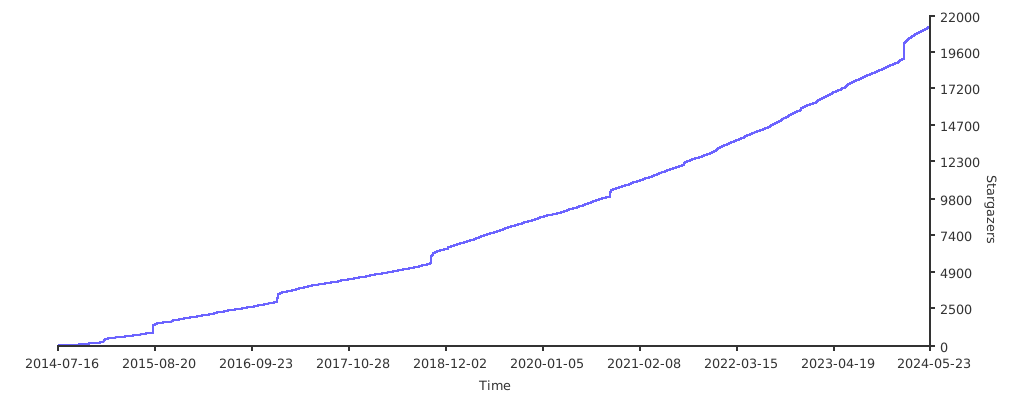
Stargazers over time